This post will update as we solve more common errors, please check if your error is mentioned here before asking for help in a separate thread
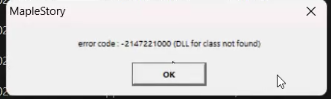
DLL for class not found:
Spoiler
[image: 1773090536806-20bb38fa-3205-4337-abad-36de11404321-image.png]
This error can occur when you run the game from inside a OneDrive folder like Downloads/Documents or even from the Desktop, move your game folder to your disk, C:/ or D:/, and it should work.
Missing DLL files
Spoiler
[image: 1773091675905-737b1883-e53a-489b-8428-c2418f6f21d6-image.png]
[image: 1773091687631-83360031-e5a4-4eae-8333-a9cb2fac0f95-image.png]
This error occurs because of missing visual c++ dll files, you can get them by following this quick installation from Microsoft: https://aka.ms/vs/17/release/vc_redist.x86.exe
Unspecified error on Mac (using parallels)
Spoiler
[image: 1773092907511-b7231bbe-202c-4f55-be0c-ba0e2e93602c-image.png]
The solution to this is to change the game's resolution (using the config.ini file from the game folder) to the Mac aspect ratio of 16:10, for example from 1280x720 (default) to 1280x800